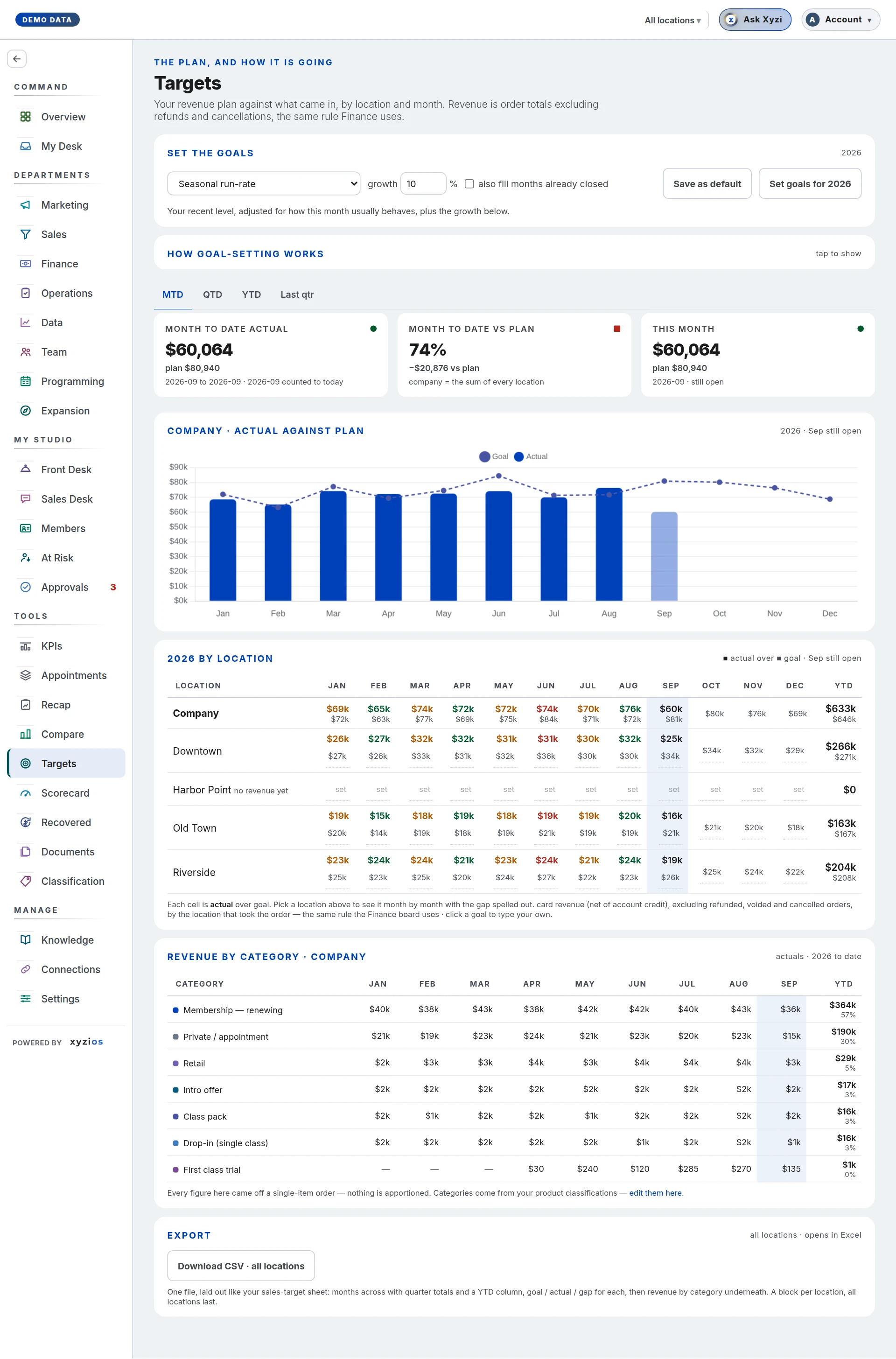

What this board answers
How is the studio doing against its revenue plan, month by month and location by location? Two words matter here: the plan is the whole year, a goal is one month in it. Owners set both from this board; everyone who can open it reads the same figures. Revenue is order totals excluding refunds and cancellations, the same rule Finance uses.
How to read it
The location switcher at the top picks All locations or one site. If you manage one location you see only your own.
The period tabs set the window for the cards. Owners and admins also see 1Edit goals beside them, the one place goals are set.
Four cards, each named with the window: 2actual, with the plan beside it; 3vs plan as a percentage (green at 100%, amber at 90%, red below); 4This month, with its goal and what it takes a day to reach it; and the year’s plan, with how much of it has been taken so far. When the window holds this month, vs plan counts it pro rata: its goal for the days the month has had, so the 23rd of a month is not scored against the whole month’s goal. With no plan set the cards say so instead of a percentage.
5Company · actual against plan is the chart: bars for what came in, a dashed line for the goals, the open month drawn paler because it is a partial.
On All locations, the grid titled with the year 6by location shows every site plus a Company row, with a YTD column. Three views of the same cells: Actual and goal (actual over goal), % of goal (this month against its goal so far), and Goals (the plan alone, with the year’s total). plan, no sales yet marks a row with goals and no revenue; not a studio location marks a revenue bucket such as an online store that belongs to the company but is not a room. Pick one location and the grid becomes that site by month: Month, Actual, Goal, vs goal and Attainment, with so far, upcoming, not started and no goal set where they apply.
Goals by category appears when goals were set by product category: each category’s takings against its goal for the window, then Everything else against the part of the plan no category holds, then the total.
7Revenue by category breaks the year’s actuals down by product classification, each with its share. The note beneath says whether any figures were apportioned across multi-item orders.
Export offers Download CSV, laid out like a sales-target sheet.
What to do here
Owners and admins can change goals, and so can a Director granted Manage the studio; everyone else reads.
- Press Edit goals, or click any goal in the grid to open it at that box. Every location’s goals for the year are boxes, this year or next; nothing is saved until Save.
- Type into any box, or paste from Excel or Google Sheets. Copy the location names and the month headings with the figures and each figure lands in its own place, whatever order your sheet is in; a total row is left out, because the company is always the sum of its locations. Anything that could not be placed for certain is listed under the tools.
- Drag across boxes, shift-click, or click a location or a month to select, then Fill right, Adjust by a percentage, or Clear. Enter moves down a column. Undo steps back and Discard changes drops them all.
- Suggest goals works goals out from your own history: pick a rule (Seasonal run-rate, Trailing 90-day average, Same month last year, Last month, Calculated growth — fit my own trend, Match actual — no goal was set), set the growth % (it dims for the two rules that ignore it), tick also fill months already closed if you want closed months planned too, and press Fill empty boxes. Only months with no goal are filled, at every location, as changes you can look over before Save. Save as default keeps the rule and growth for next time. How the rules work folds out the rules in full and says whether seasonality is on (it needs 13 clean months).
- By category sets goals below a location’s month: each location opens into the product categories it sells, plus Not by category, the part of its goal no category holds. A location’s total is the sum of its rows. Click a location’s name to fold its categories away; + Category adds a category to every location. In Totals, typing or clearing a month that has category goals changes only the part no category holds, so a category goal is only ever changed in By category; a figure below what the categories already hold is refused.
- The Company row cannot be typed into: it is always the sum of the locations. A location that has not opened yet is left out of the company’s goals, on the board and in the editor.
Changed boxes are highlighted and the totals follow as you type. Dimmer figures came from Suggest goals or an import; whatever you type or paste is saved as your own, and a suggestion you keep as it stands is saved as the rule’s.
Common questions
Why is “vs plan” not simply actual divided by the year’s plan?
The percentage counts only the months that carry a goal, so a plan that starts in September is not scored against January’s takings, and this month counts pro rata, for the days it has had. The actual card still shows the whole window, and says when the two differ.
We have a plan but the card says nothing closed to score yet.
Goals were set this month. The first closed month will score it.
A location tab says no plan set while the company has one.
Goals are per location; set that site’s in its row. A planned site’s goals start counting at its first sale.
Can I paste our plan from a spreadsheet?
Yes. Press Edit goals, click the first box, and paste. With the names and headings copied too, rows are matched by location name and columns by month, and a column for another year is left out. In By category, paste one location’s category rows into its boxes and they match by category name. Nothing saves until you press Save.
What is the difference between a blank box and 0?
A blank box is no goal for that month. 0 is a goal of nothing, which any sale beats. A spreadsheet’s “$ -” pastes as 0.
Does Suggest goals overwrite anything?
No. It fills only months with no goal at all, and only in the editor: nothing is written until you press Save.
What does “also fill months already closed” do?
Without it, suggestions start at the open month. With it, closed months get goals too, worked out only from the months that had finished when each began, which is what gives year-to-date something to divide by.
Do I have to plan by category?
No. Totals is one goal per location per month, as before. Categories are there when you want a goal for retail or memberships on its own; the board then scores each against what it took.
Why is there a row that is not one of my studios?
Some orders carry no location in the booking platform. That money is real and counts toward the company, so it is shown and labelled rather than hidden.
I set goals and the Scorecard still says the revenue plan is missing.
Both refresh on the next build; give it a few minutes.