
The lists
Retention is for keeping the members you have. The dropdown at the left of the list’s toolbar picks the list: At risk, the members whose rhythm has slipped, and these lists, from your booking platform as of the last refresh, each with how many are on it. Each is laid out as At risk is, one card with its toolbar across the top (Filter, Search a name, ⋯ with Export CSV) and the same rows, and each works with the Contact log as the Sales Desk’s lists do:
- Membership expiring — next 90 days — everyone whose last membership or paid-in-full pass ends in the next 90 days and will not renew, soonest first. Why says which: Cancelled, with the reason they gave and, in its hover, the day they cancelled, or Term ends, where nobody cancelled and a fixed term runs out. At a MindBody studio the list is read from each client’s contract: Not set to renew is a contract that ends with no renewal and no next contract signed, and Cancelled is one with a termination date already entered; MindBody gives neither the day it was entered nor a reason. It is shown there only while every site’s contracts have been read in full within the last 10 days, and is left out otherwise. The line under the board’s name says how many fall in the next 30, 60 and 90 days, and Export CSV downloads the list. On All locations at a studio with several sites they cover every location you can see, in one file with a Location column. The dot darkens when the last day is inside 30 days. A membership that renews is never on it. Someone who holds another membership that renews, or has already bought their next one, is left off, and so are freezes, intros, packs and comps.
- Cancellations — last 30 days — plan switchers removed; active means access is still running, and the dot is darker while it is
- Payment failures — members whose latest payment did not go through, the same people as Payment failure across all your locations, at the location where the membership was bought, newest failure first. Failed says how long ago, the dot darkens inside 7 days, and Payment is what did not clear, or the dues where the failed charge is not known. Someone with an active membership beside the failing one is not listed. They leave when your booking platform shows the payment cleared. Where the platform sends no failure dates, Failed is the night Xyzios first saw it, marked seen, and a failure waits one night before it shows, because many clear by themselves.
- Paused members — members on a pause with nothing active beside it, the same people as the paused count on your boards, at the location where the paused membership was bought. Pauses with an end date come first, soonest first, so you can reach them before they are due back; the dot darkens when Back is inside 14 days. Then the pauses with no end date, longest first. Where your booking platform sends no pause dates (MindBody), Paused since is the night Xyzios first saw the pause, marked seen, “—” for a pause that began before Xyzios was watching, and there is no end date. They leave the list when the pause ends or another membership of theirs starts. A studio with nobody paused has no such list.
- Low use — members who came far less than members on the same plan usually do in the last 30 days: under a quarter of the usual number of days, the usual being the middle member’s. Use, last 30 days says how many days they came and the plan’s usual; Last visit when they last came, and the dot is nobody in 30 days. No booking platform says how many classes a plan allows a month, so the plan’s own members are the measure. A plan whose members usually come under four days in 30, or with under five members, is left out, and so is a member who joined in the last 30 days and anyone on leave. A member At risk also holds is on it too, with At risk before their days, so whoever calls can see they are on both lists.
Filter narrows each list: Payment failures by how recently the payment failed, Cancellations by whether their access is still active, Membership expiring to the next 30 or 60 days, Paused members to those back within 14 days or with no end date, and Low use to those not on At risk, those with no visit in 30 days or those who came at least once. Each choice says how many it would show, and one with nobody in it is left out. Where you keep a Contact log, Not yet contacted is in Filter too. Filter stays open while you choose, so you can set two at once, and the number on it says how many are set.
Draft email
Where your studio has the CRM, the card has Text, Call, Email and More instead. Text and Email open the conversation in the card, and pressing Send is your approval. A send from At risk or Payment failures goes through one card, so it reaches Recovered Revenue; Cancellations, Membership expiring and Paused do not. A message Xyzi drafted sits in the box for you to send, change or drop. Drop closes the card for good and asks first, saying how long that person stays off the list. If a send does not go through, the card says so and stays open, so you can try again. One held for your sending hours goes on its own, and rejecting it in Approvals stops it.
Draft email is in the member’s card, the panel that slides out beside the list: press anywhere on a row to open it, or Call, Text or Email on the row where your studio keeps a Contact log. On a phone, Open on the row opens it. It writes that member an email and puts it in Approvals. Nothing is sent until someone approves it. Each list writes its own kind of email: a fix-up note on Payment failures, a check-in on At risk, and a note that fits the list on the others. It works whether or not your nightly drafting is on.
It needs your studio’s own email domain verified first, so the email comes from your address and never a Xyzios one. If the domain is not set up or its DNS records are not in place, the button says so. A member marked do-not-market, or one with no email on file, is not drafted, and neither is someone who already has an email waiting in Approvals or had one recently.
Work list
Where your studio has the CRM, every list here but On leave has a Work list button at the right of its toolbar, At risk included. It works the list one person at a time on the whole screen: who they are, why they are on the list and their facts on the left, their conversation and the message box on the right, Call beside them, and 1 of 8 in the bar.
- The up and down arrows move between people, and Skip goes to the next one.
- Next comes up after a text, an email or a logged call. It moves to the next person and does nothing else: no message and no call starts until you press on that person.
- It works the list as it was when you opened it. Someone who leaves the list while you work stays until you pass them.
- Words in the box are asked about before you move on.
- An outcome you log counts on the list you are working, so that person clears from it. At the end of the list, Back to the list takes you back.
On leave
Someone away for a while, for medical reasons or travel, can be marked On leave until a date. Open them from a list and press Mark on leave in the slide-out, then choose the last day of their leave and a reason: Medical, Travel or Other.
While a leave stands they are off At risk, and the nightly agents draft nothing for them: no save, payment recovery, intro rescue or referral. Draft email says they are on leave. An email already waiting in Approvals, or one you ask Xyzi for in chat, is refused at the send, so reject it. They stay on the other lists, because those are facts from your booking platform and a failed card may still want a call. On leave, in the list’s dropdown, lists everyone away, with End leave on each row. It is there only while someone is on leave. In the slide-out, Change moves the date. The day after their last day they are back by themselves, and the next night’s scoring reads them like anyone else; end a leave early and the same goes, so they are back on At risk the next morning if they still belong there.
The reason shows only to owners, Directors and Location Managers on this board. Front desk and instructors see that someone is on leave and until when. The Activity log records who was marked and until when, never why. Someone with no location on file has to be marked by an owner or a Director.
What this board answers
Which members are drifting away, how badly, and whether anyone has already reached out. It is the working list for whoever makes the save calls: the owner, a Director, a Location Manager, or a front desk that has been handed the list. Nothing on this board contacts a member. Saves are proposed by the Attrition agent and wait in Approvals.
How to read it
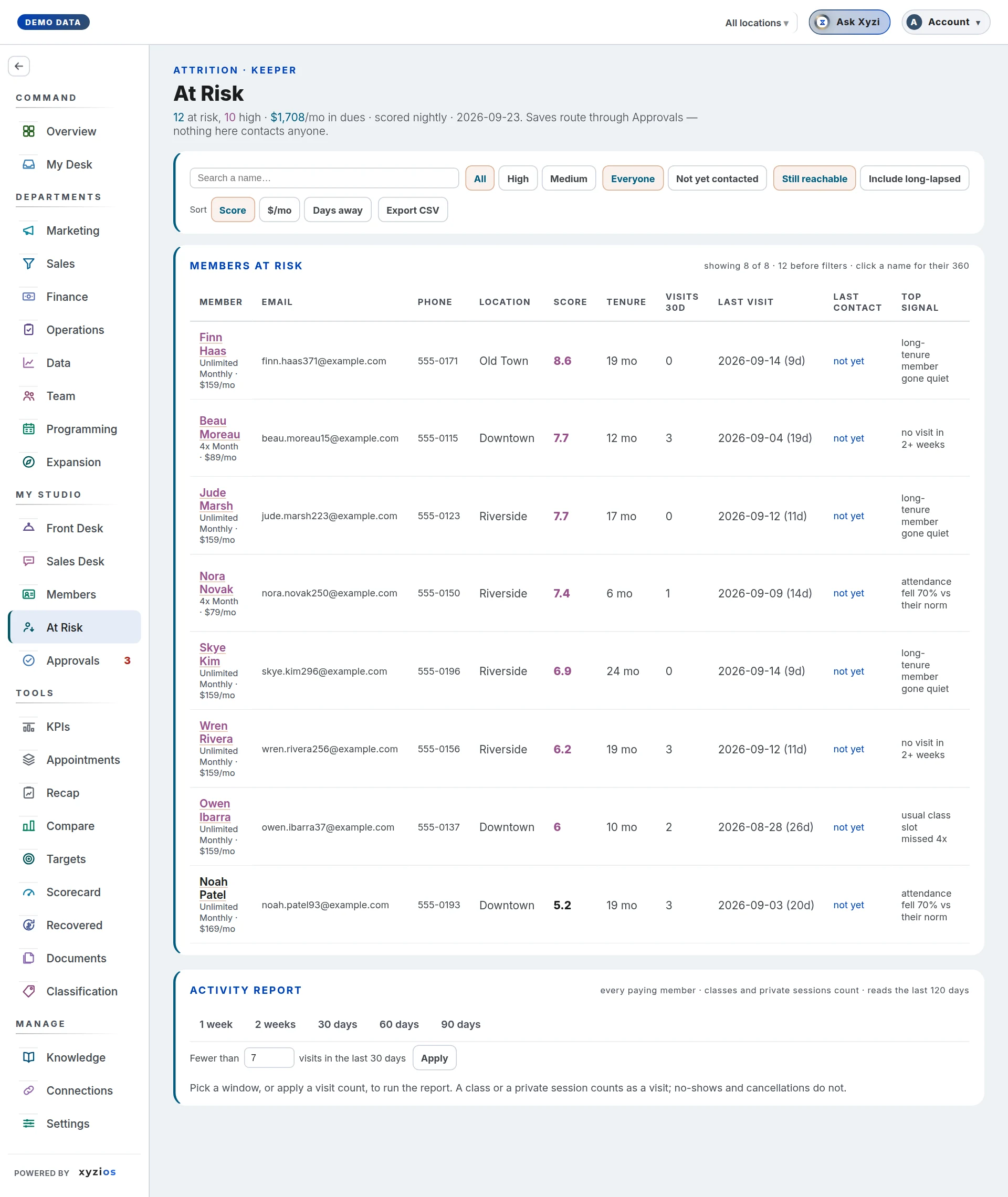
The list sits on one card with one toolbar across the top:
- 1At risk, at the left, is the list you are on. Press it for the other lists, each with how many are on it.
- 2Filter holds the band and two questions, each ticked or not. It stays open while you set them, and the number on it says how many are set.
- All, High or Medium picks the band. High is a score of 6 or more; the list starts at 3.
- Not yet contacted, ticked, leaves out everyone an outreach actually reached, read from the Approvals record. A rejected proposal counts as not contacted, because nobody spoke to them.
- Include long-lapsed, ticked, adds the people more than 30 days out. They are left off until then, because on a studio’s first day the list is mostly people who left long before Xyzios saw them. Members in payment failure are on the list either way.
- 3Search a name, on the right, narrows the list as you type. Escape clears it.
- Sorted by Score, $/mo or Days away. Front desk sees no money on this board, so $/mo is not offered to them.
- ⋯ holds Export CSV, which downloads the filtered list, email and phone included, each field in a column of its own.
Each control is a dropdown you can work from the keyboard too: Enter opens it, the arrows move, Enter picks and Escape closes it. On a phone the toolbar takes two rows, with Work list under them.
The line at the foot of the list says how many are 4at risk and how many are high, and that the list is scored nightly with the date of the last scoring. Anyone who has come in since that scoring, or has a class or private booked from today on, is left off the list and out of its counts until the next scoring, so nobody calls or emails them. A save email already waiting in Approvals for them is refused at the send, a call already given as a task is closed, and their page no longer shows them at risk. Beside the counts is what the listed members pay in dues a month, so you know what the list is worth; when some rates are unknown it says how many members it could price, and front desk accounts are not shown the total. While the studio is new to Xyzios it may add signals still learning: the weights are standard ones until enough of your own cancellations have been seen. If your access is fenced to your locations, a banner under the board’s name reads Scoped to your locations, and members whose location was never recorded are left out rather than guessed.
The location switcher in the top bar scopes this board like every other one; there is no second picker on the page.
The list shows 100 members at a time, with a button under it for the next 100. It fits the width of the screen, one row a member, and a press anywhere on a row opens the member beside the list:
- Member: the name, then the plan and monthly rate, then the location. The location is left off when you are looking at one location.
- Contact: the phone, with the email under it. A long email is shortened; point at it to read all of it.
- Score · why: the score and the top signal, with +2 more when there are other signals (point at it to read them), and the suggested move under them.
- Last visit: the date and how many days ago, then visits in the last 30 days and how long they have been a member, in days, months or years.
- Last contact: the date of the last outreach and what it was, or not yet.
- Handled and Assign, side by side at the end of the row. Where the studio keeps a Contact log, Call, Text and Email take Handled’s place, each opening the member beside the list, and a conversation logged there records Handled (see below). On a phone, where each member is a card, Open opens them.
High members, a score of 6 or more, have their name and score in colour. Signals are plain sentences: days since last visit, attendance down by half or more against the member’s own norm (their usual month over the 90 days before the last 30), a usual class missed the last three times it ran, no-shows or late cancels up against their own norm (each counted on its own), back from a pause with no visit since, a move to a cheaper plan in the last 60 days, a new member with low engagement, no future bookings, payment failure. Back from a pause is read where the booking platform keeps a pause after it ends, which is MindBody today, and a move to a cheaper plan where it dates a change of plan, which is Mariana Tek today. The column names stay at the top while you scroll. On a phone or a tablet each member is a card instead, with the buttons along the bottom.
When nobody is left to show, the list says why: nobody is at risk right now, everyone on it has been away more than 30 days (with Include long-lapsed beside it), or the filters leave no one (with Clear filters, which shows the whole list).
The Activity report
Under the radar sits a second card, the 5Activity report. Where the radar lists only the members the scoring put over its threshold, the report answers a plainer question over every paying member: who has not been in? It runs when you ask, not when the board opens, and it reads the last 180 days of attendance.
Inactive means no visit inside the window you choose, and a visit is an attended class or a private session: a member who had a private yesterday is not inactive. No-shows and cancellations are not visits. A booking that is still ahead does not count as a visit either, but it is shown, because “quiet but booked for Thursday” is a different call from “quiet”.
Two modes, one at a time:
- No visit in…, at the left of the card’s toolbar, picks 1 week, 2 weeks, 30 days, 60 days or 90 days and lists everyone with no visit in the last that-many days, counted up to and including today. A visit exactly that many days ago is outside the window, so someone last seen 7 days ago appears on the one-week list.
- Fewer than N visits in the last 30 days, with Apply, at the right of the same toolbar, lists everyone under that count whatever their last date. Seven is the number the owner who asked for this uses.
A line above the table reads, for example, 38 of 121 paying members: the first number is who matched, the second is every paying member in the scope you are looking at. The location switcher scopes the report the way it scopes the radar; if your access is fenced, the same Scoped to your locations banner applies and members whose location was never recorded are left out. The report also leaves out your own staff, matched to their client profile by name or email, and anyone who has been a member for six months or more without a visit in the last six months, has nothing booked and has not been charged in the last 45 days; the same line says how many of each it left out, for example leaves out 9 staff and 7 not in for 6+ months.
The table has four columns, the way the list above does: Member (their plans and, except for front desk, the monthly rate, then the location), Contact (the phone over the email), Last visit (how many days ago, then the date) and Visits (in the last 30 days, what they have booked ahead, and how long they have been a member). The quietest people come first: anyone with no visit in the last 180 days shows 180+ days and sits at the top, then the longest gap down. A person holding several active rows of one membership, which some booking platforms write every billing cycle, is one row here. Export CSV downloads the rows on screen, each field in a column of its own.
What to do here
- Pick a location, choose High in Filter, and work down the list. Press a row to open the slide-out before you call; Open full profile at its top opens their Member 360.
- When you have spoken to someone, tap Handled. The row stays, marked Handled with the date and the role of whoever pressed it. Anything waiting for that member in Approvals is withdrawn and counts on Recovered Revenue from the tap, the way a sent email does. No new save or payment recovery draft is proposed for seven days, so nobody hears from the studio twice about the same thing.
- To have someone else make the call, tap Assign beside Handled. Under Who makes the call pick a person, anyone in a role, or Open to the team; under When, Today, Tomorrow or another day; then tap Give the call. They get a task, “Call Jane Doe: at risk”, with the member’s top signal and the suggested move in its notes. A role or the team means the people at the member’s location. Until the call is done, the row says Given to and who has it, for anyone who can see that task on Tasks. When they tick it done, the member is marked Handled as if you had pressed it, even if they cannot open Retention themselves, and the record names you both. If the member comes in, or books a class or a private, before anyone starts the call, the task is closed on its own within about 15 minutes, with the reason in its activity, and the member is not marked Handled. A call marked Doing is left for whoever is making it, and one you reopen after it was closed stays open.
- For a High member who slipped within the last 30 days, is in payment failure, or is new and has never come in, you can leave the row alone instead: the AI team drafts the save, the Suggested move is what it proposes, and it arrives in Approvals for a decision. Everyone else waits for a personal call.
- Use Export CSV, under ⋯, to take the list to the desk on a phone.
- For a plain “who has not been in this week” list, or everyone under seven visits this month, run the Activity report below the radar and export it. It is a list to read and call from; nothing on it contacts anyone.
Handled records that a conversation happened. It never contacts anyone and it never hides the person.
Under the new look each row is one line where it fits: the risk dot, the score and the strongest signal, on two lines where it is long, with a grey +2 (or however many) for the rest. Hover over it to read them, or tap it to open the member beside the list, where Why they’re at risk lists every one. Last visit says how long ago, and Last contact what the last contact came to and when, “Reached · today”; who made it is in its hover. Where a row would not fit, its phone, membership and location move to the grey line under the name. Where the Sales Desk keeps a Contact log, each row has Call, Text and Email where Handled was. Each opens the member beside the list, where you log what happened as you do on the Sales Desk’s call lists; it is logged at the member’s own location. A conversation logged from Retention (Reached, or They replied) records Handled for them, with all that Handled does: anything waiting for that member in Approvals is withdrawn, and no new save or payment recovery draft is proposed for seven days. A voicemail, a message only sent, or no answer records nothing more, and the member’s pane says to try again. A conversation marks the row done for that week, and Last contact shows what was tried. On Retention, the Completed menu also offers Wants to cancel, under Heard, for a member who told you so: it is what you heard, not something completed, so the log says it beside what happened, never counts it as Completed, and it takes nobody off the Engaged list. Unlike any other conversation from Retention it does not record Handled: nothing waiting for them in Approvals is withdrawn, save drafts for them carry on, and they stay on the list. Undo, in the member’s pane, takes back the contact, not the Handled it recorded. Assign stays on the row; once the call is given it reads Assigned, and who has it is in its hover. Where Tasks is on, Assign list at the foot of the list gives the whole list to someone as one task, “Work Retention (9 people)”, for a person, anyone in a role, or the team. The number is the board’s own count of members at risk, whatever the filters show. The foot then says who has it and how many of its people have been logged from Retention since. A list is given once at a time at each location; when the task is ticked done it can be given again. Someone fenced to locations gives a list at one of their locations at a time, from that location’s tab. The count reads the last 90 days of the log.
Common questions
The count at the foot is bigger than the rows I see.
That line counts everyone at risk; the default view hides people more than 30 days out. Tick Include long-lapsed in Filter to see them all, and check the band and Not yet contacted there.
A member on a medical hold is still on At risk.
Xyzios takes someone off the list when your booking platform shows their membership paused. A hold kept any other way, in a note or an arrangement at the desk, is not something it can read, so mark them On leave in the slide-out.
Someone I called yesterday still shows “not yet” under Last contact.
Only outreach that went out counts: an approved email that was sent, a Handled tap, or, where the studio keeps a Contact log on Call Lists, a call, a text or an email logged there. A contact logged there moves Last contact and does not mark the member Handled; under the new look, a conversation logged from Retention itself does. A call made outside Xyzios is not known unless someone taps Handled or logs it.
A member has no save waiting in Approvals.
Proposals go only to High members, and of those only to the recently slipped (within 30 days), to members in payment failure, and to never-attended members while they are still new. Everyone else, every Medium member included, stays on the radar for a personal call.
Who can use Assign?
Anyone who can press Handled on that member: Retention is one of their boards and the member is on their own list. The call goes to someone else, to anyone in a role, or to the team, never to you: to make the call yourself, press Handled once you have.
Assign says the member’s call is already a task.
A member has one call at a time. Open Tasks to see who has it; once that task is done or cancelled, you can give another.
A call was ticked done, but the member is not marked Handled.
A call marks the member Handled only when it is done within 14 days of being given. After that, ticking it finishes the task and nothing more; if the conversation happened, press Handled yourself.
Who can see this board?
Owners, Directors, Location Managers and front desk, each within their locations. Instructors do not, by default. A Location Manager or front desk with no location ticked sees the studio’s one location when it has only one. At a studio with more, they see no list until the owner ticks theirs in Settings › My Team, and the board says so.
The foot shows a number and the list is empty.
The list loads separately from the rest of the app, so reload. If it stays empty, the line in its place says why: everyone on it has been away more than 30 days (tick Include long-lapsed), or the filters leave no one (Clear filters).
Someone is on the Activity report but not on the radar, or the other way round.
They answer different questions. The radar scores risk from several signals and lists people over a threshold; the report is a plain count of visits over a window, for every paying member. A brand-new member with no visit yet is on both; a regular who missed one week is on the one-week report and nowhere near the radar.
The Activity report says “180+ days ago” under Last visit.
The report reads the last 180 days of attendance. Someone with no class or private session in that time shows 180+ days rather than a date; it does not mean they have never been in. Because the report leaves out anyone away six months or more who is not still being charged, the people who show 180+ are newer members who have not been in yet, someone with a booking ahead, or someone still paying who has not been in for six months: often the call most worth making.
A staff member, or someone who stopped coming long ago, is missing from the Activity report.
That is on purpose: the line above the table says how many staff and how many people away six months or more it left out. Someone who used to work at the studio and still trains is not left out, if your booking platform records that they left.