
What this board answers
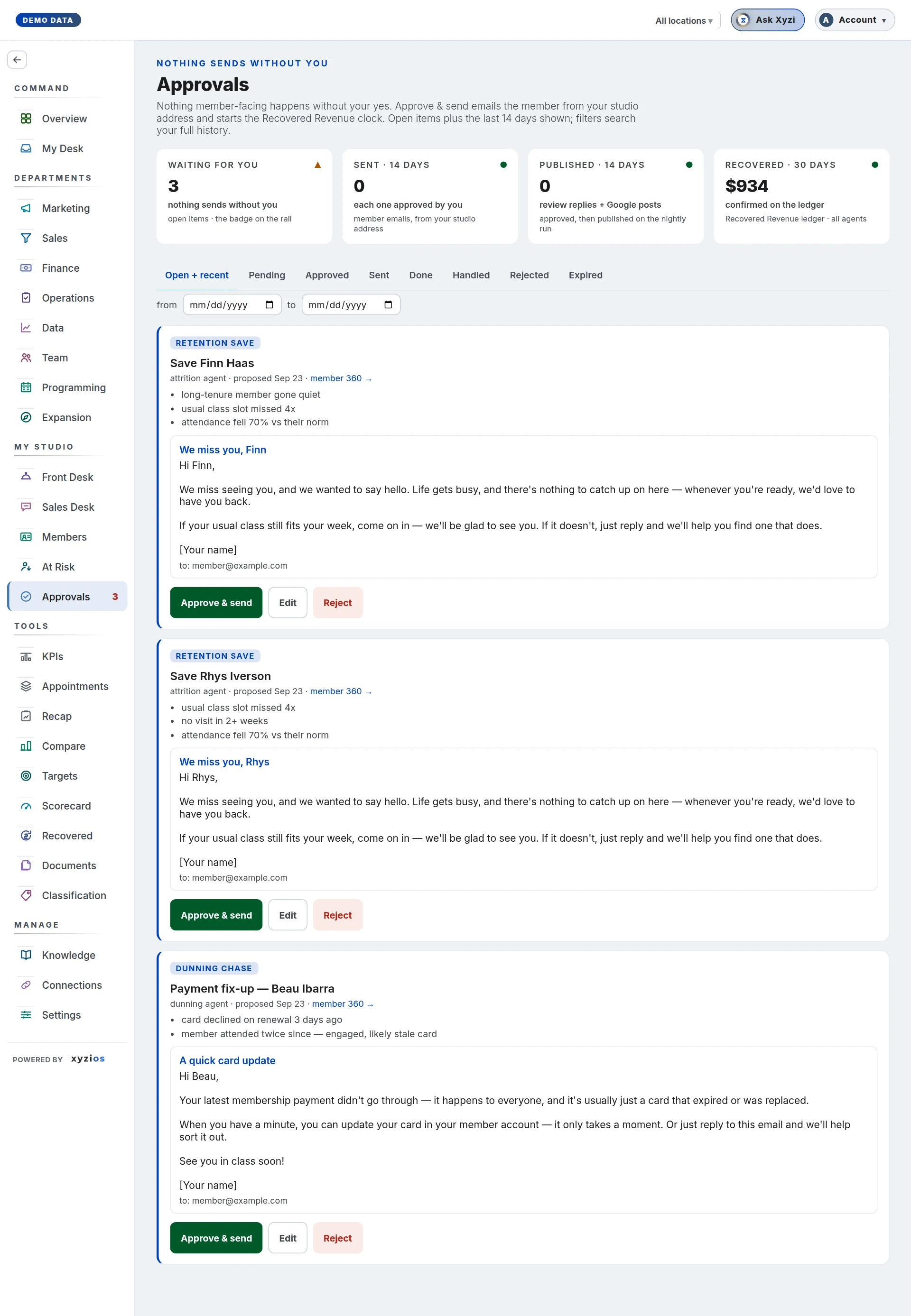
What is waiting on you. Every draft that would reach a member, a review or your Google listing lands here first, and nothing goes out until a person approves it. The header says it plainly: Nothing sends without you. Approving also starts the clock on Recovered Revenue, so a decision here is where the proof number begins.
How to read it
Four cards sit above the list. 1Waiting for you counts the drafts nobody has decided, the same open items the rail badge counts, with the monthly dues in play when they are saves. 2Sent · 14 days counts member emails that went out from your studio address, each one after an approval. 3Published · 14 days counts review replies and Google posts, which go out on the nightly run once approved. 4Recovered · 30 days, on All locations, is the money confirmed on the Recovered Revenue ledger in the last 30 days, from every agent.
The tabs filter by status: 5Open + recent (the default: everything undecided plus the last 14 days of history), Pending, Approved, Sent, Done, Handled, Rejected, Expired. Under them, from and to dates search your full history; clear dates returns to the default view. The location switcher scopes the list: an action tied to a member shows under that member’s location, and studio-wide actions (posts, replies, special hours) show everywhere.
Each card carries the action type, the title, which agent proposed it and when, and a 6member 360 → link when a member is involved. Below that: the agent’s reasons, the review being answered, and the draft itself. A decided card is dimmed and wears its status; handled in person means the desk dealt with the member before a decision was needed.
Cards you will meet: a save email for an at-risk member, a payment notice for a failed card, an intro rescue, a referral ask, a public reply to a Google review, a Google Business Profile post or special hours, a Xyzi proposal, and a financial report read that adds numbers to the Finance cards.
The rail badge counts what still needs a person: pending items, plus approved emails not yet sent.
What to do here
- Read the draft. Edit opens the subject and body in place; Save changes keeps your version and the original beside it. Deciding another card while an editor is open does not lose your text.
- Approve & send a member email. A confirmation names the address first; the email then leaves from your studio address and the card moves to Sent. If a send is refused (no email address on file, say), the approval stands and a Send email button offers a retry. Copy takes the subject and body to your clipboard.
- Approve & publish tonight is for review replies and Google posts, Approve & apply tonight for special hours: they go to Google on the nightly run and nothing asks you again, which is why a confirmation shows the text first. Until that run, Edit before it goes and Reject instead are still offered.
- Reject asks why in one tap: Wrong person, Wrong words, Wrong timing, Already handled, or Just reject. The reason teaches the agents what to retarget, rewrite or re-time.
- A Xyzi proposal has no send step. Approving it records that you agreed; the action is yours to carry out.
- A financial report read offers Add to Finance cards, which merges the numbers now.
There is no undo. An approval is a one-way record; if you approved the wrong thing and it has not gone out, reject it, which records the reason too.
Who decides: the owner, an admin and a Director can approve, reject, edit and send anything at the studio. A Location Manager can decide and send only actions tied to a member at one of their own locations, which is also all the board shows them. Anyone else holding the board can read it; the owner can switch on Act on approvals for a person in Settings → Permissions → By person to let them decide for their own locations. Front desk and instructors do not have the board.
Common questions
I approved something and it came back as pending after a reload.
The toast said Not saved — it may already be decided, or not yours to decide. Someone else with the board open decided it first, or the action is outside your locations. Reload and read its status.
Approved, but not sent. Which is it?
A member email is approved and sent in one step, Approve & send. One still waiting under Approved is an email whose send was refused; its Send email button tries again.
An item disappeared without a decision.
After 14 days without a decision an action expires and its ledger entry earns nothing; the Expired tab lists them. A member the desk marked Handled moves to Handled.
Does the unsubscribe list apply?
No. These are your studio’s own one-to-one member emails, not marketing, so your approval is the only stop before an email goes out.
The queue is empty.
Then nothing needs you: Nothing waiting on you — actions appear here as your AI team proposes them. With a location selected, the board says how many are waiting at your other locations.